Businesses spend countless hours every week handling repetitive tasks. Employees respond to similar emails, enter information into multiple systems, process documents, qualify leads, schedule meetings, prepare reports, and answer recurring customer questions.
While traditional automation can handle many predictable tasks, artificial intelligence makes it possible to automate processes that involve language, documents, decisions, and large amounts of information.
This is why AI business process automation is becoming an important part of modern digital transformation.Instead of asking employees to manually complete every step of a workflow, businesses can use AI to understand information, make decisions within defined rules, and trigger actions across connected systems.
But where should a company actually start?
Not every business process needs AI. The best opportunities are usually repetitive, high-volume, time-consuming, or dependent on information that AI can interpret.
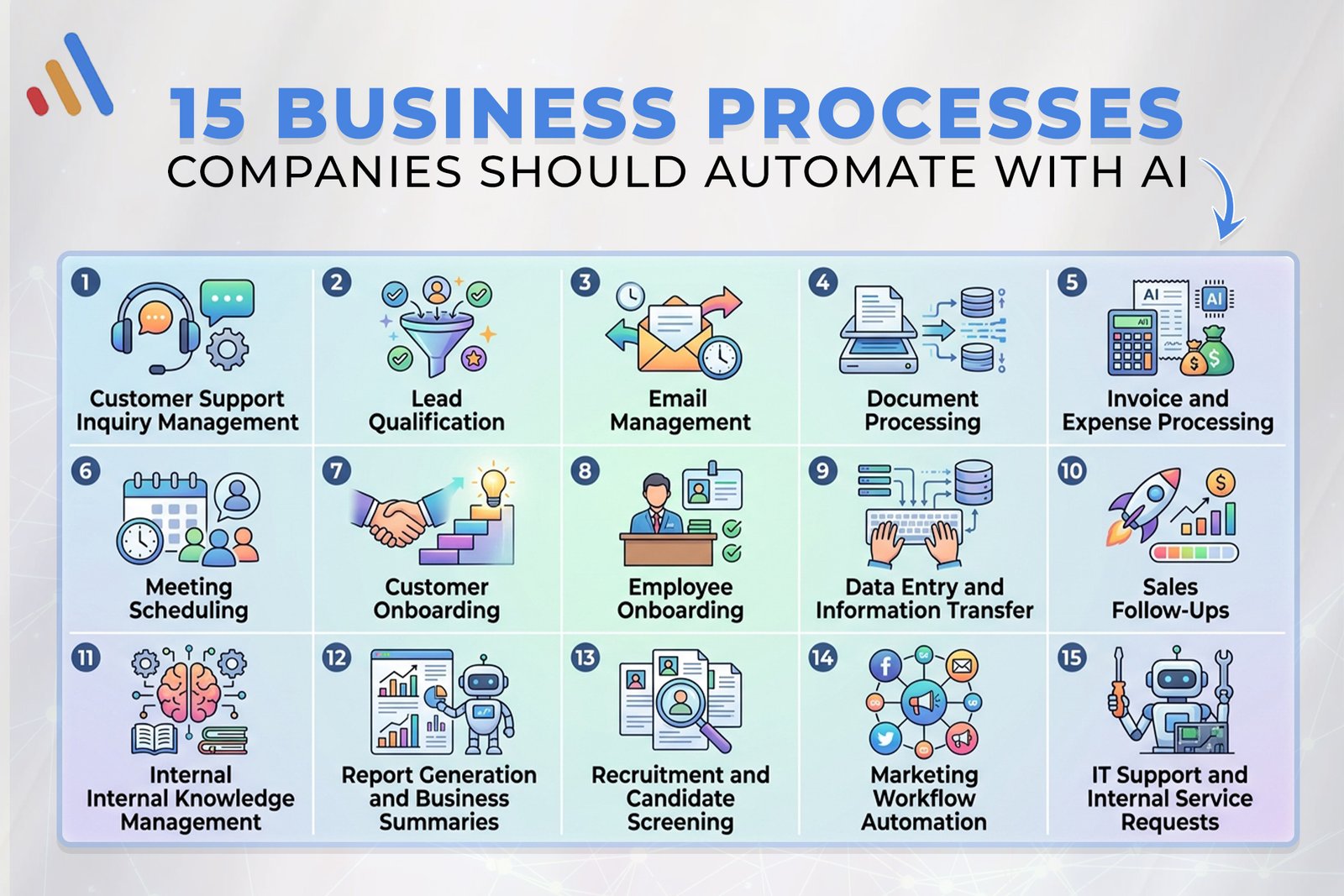
In this guide, we’ll explore 15 business processes companies should automate with AI, along with practical examples and considerations for implementing AI process automation successfully.
What Makes a Business Process a Good Candidate for AI Automation?
Before looking at specific processes, it helps to understand what makes automation worthwhile.
A business process may be a strong candidate when it:
- Happens frequently
- Requires significant manual effort
- Involves repetitive decisions
- Requires employees to read or classify information
- Moves information between multiple systems
- Generates large amounts of data
- Causes delays for customers or employees
- Has clearly defined rules and outcomes
For example, manually copying customer information from emails into a CRM is repetitive and predictable.
An AI-powered system could read the email, identify the relevant information, classify the request, update the CRM, and trigger the appropriate next step.That is where workflow automation and AI can work together.
1. Customer Support and Inquiry Management
Customer support is one of the most obvious opportunities for AI automation.Support teams often receive repetitive questions about:
- Products
- Services
- Pricing
- Orders
- Returns
- Account information
- Appointments
- Technical issues
An AI-powered system can understand customer questions, retrieve relevant information, provide answers, create support tickets, and escalate complicated cases to employees.
For example:
Customer message → AI understands request → retrieves information → responds → creates ticket if necessary → escalates complex issue
This can help businesses provide faster responses while allowing support teams to focus on issues that genuinely require human involvement.
VCL International’s AI Agent Development Services include customer service AI agents that can handle inquiries, resolve common issues, manage support requests, and escalate complex cases.
2. Lead Qualification
Sales teams often receive more leads than employees can immediately review.AI can help automate the first stage of lead management.
An AI workflow can:
- Capture a new lead
- Analyze the available information
- Identify the lead’s requirements
- Classify the lead
- Assign a priority
- Update the CRM
- Notify the appropriate salesperson
- Trigger a follow-up
This reduces the amount of manual qualification required from sales representatives.
Instead of spending time reviewing every inquiry, sales teams can concentrate on prospects that meet predefined criteria.
3. Email Management
Employees can spend a significant amount of time reading, categorizing, responding to, and forwarding emails.AI can help automate parts of this workflow.
For example, an AI system can identify whether an incoming email relates to:
- Sales
- Customer support
- Billing
- Technical issues
- Human resources
- Partnerships
- General inquiries
The system can then route the message to the appropriate workflow.For repetitive requests, AI can also generate a response based on approved business information.Human review can remain part of the workflow when accuracy or sensitivity is important.
4. Document Processing
Businesses deal with invoices, contracts, applications, reports, forms, receipts, and other documents every day.Traditional data entry requires employees to manually read these documents and transfer information into business systems.AI can automate much of this process.
A document-processing workflow could look like:
Document received → AI extracts information → document classified → information validated → database updated → employee reviews exceptions
AI can be particularly useful when documents are not formatted identically.
VCL International’s AI solutions include intelligent document processing and AI capabilities such as natural language processing, which can support document-focused business workflows.
5. Invoice and Expense Processing
Finance teams frequently process invoices and expense documents.AI can help extract:
- Vendor information
- Invoice numbers
- Dates
- Amounts
- Tax information
- Line items
- Payment details
The extracted information can then be sent to the appropriate accounting workflow.
For example:
Invoice received → information extracted → invoice categorized → approval workflow triggered → accounting system updated
Employees can focus on exceptions rather than manually processing every document.
6. Meeting Scheduling
Scheduling meetings may seem like a small task, but it can create unnecessary back-and-forth communication.AI can automate parts of the scheduling process by understanding requests and coordinating available times.
For example:
Customer requests meeting → AI identifies preferred timeframe → checks calendar → suggests available slots → schedules meeting → sends confirmation
AI agents can also support appointment scheduling as part of larger customer or sales workflows.
This can be particularly useful for sales teams, consultants, healthcare organizations, service businesses, and professional firms.
7. Customer Onboarding
Customer onboarding often involves multiple steps.A typical process may include:
- Collecting customer information
- Verifying documents
- Creating accounts
- Sending welcome messages
- Assigning internal tasks
- Updating CRM records
- Scheduling follow-ups
AI can help coordinate these activities.
For example, an AI system could review submitted information, identify missing documents, notify the customer, update internal systems, and create tasks for employees.This reduces the administrative work involved in moving a new customer from signup to active account.
8. Employee Onboarding
AI automation can also improve internal employee onboarding.When a new employee joins a company, HR may need to coordinate:
- Documents
- Accounts
- Equipment
- Training
- Policies
- Team introductions
- Access permissions
- Scheduling
An automated workflow can coordinate these steps.
For example:
New employee added → HR system updated → onboarding checklist created → relevant teams notified → documents distributed → training scheduled
An AI assistant can also answer routine employee questions by retrieving information from approved company knowledge sources.This allows HR teams to spend less time answering repetitive administrative questions.
9. Data Entry and Information Transfer
Data entry is one of the most common sources of repetitive work.Employees may need to transfer information from:
- Emails
- PDFs
- Forms
- Websites
- CRM systems
- Spreadsheets
- Applications
AI can extract information and pass it into the appropriate business system.
For example:
Customer form → AI extracts details → validates information → CRM record created → sales workflow triggered
This can reduce repetitive typing and the risk of manual transcription errors.
When more advanced customization is required, VCL’s Software Development Services can be used to build business-specific applications and integrations around existing workflows.
10. Sales Follow-Ups
Following up with leads is important, but sales representatives can struggle to maintain consistent follow-up schedules.AI automation can help create structured follow-up workflows.
After a sales interaction, an AI system could:
- Summarize the conversation
- Identify customer requirements
- Update the CRM
- Determine the next action
- Generate a personalized follow-up
- Schedule a reminder
- Notify the salesperson
Instead of relying entirely on employees to remember every follow-up, automation can keep the process organized.Human sales representatives can still review and approve communications when appropriate.
11. Internal Knowledge Management
Employees frequently need answers to questions about company policies, procedures, products, systems, and internal documentation.
Finding the correct information manually can take time.An AI-powered internal assistant can search approved company information and provide relevant answers.
For example:
Employee asks question → AI searches company knowledge → relevant information retrieved → answer generated → source information provided
This can reduce the amount of time employees spend searching through documents and internal systems.VCL’s AI Agent Development Services include knowledge-management capabilities that allow AI agents to search internal documents, policies, manuals, and knowledge bases.
12. Report Generation and Business Summaries
Businesses generate reports from many different sources.Employees may spend hours collecting information, organizing it, and preparing summaries.AI can help automate parts of this process.
For example:
Business data → AI analyzes information → key trends identified → summary generated → report distributed
AI can help create summaries of:
- Sales performance
- Customer activity
- Operational performance
- Support requests
- Marketing campaigns
- Internal activities
For advanced requirements, AI models can also be developed to identify patterns, make predictions, classify information, and generate business insights. VCL’s AI Model Development Services cover custom machine-learning, predictive analytics, NLP, recommendation engines, and generative AI models.
13. Recruitment and Candidate Screening
Recruitment teams may need to process large numbers of applications.AI can assist with administrative parts of recruitment by:
- Extracting candidate information
- Organizing applications
- Categorizing candidates according to defined criteria
- Scheduling interviews
- Sending communications
- Maintaining candidate records
For example:
Application received → information extracted → candidate categorized → recruitment workflow triggered → interview scheduling
Human recruiters should remain involved in important employment decisions, particularly where context, fairness, and judgment are required.The objective is to reduce administrative workload rather than blindly automate every hiring decision.
14. Marketing Workflow Automation
Marketing teams manage numerous recurring activities.AI can support workflows involving:
- Lead nurturing
- Customer segmentation
- Content workflows
- Email personalization
- Campaign analysis
- Customer feedback
- Reporting
- Recommendation systems
For example, a marketing workflow could analyze customer behavior and automatically place contacts into appropriate communication sequences.AI can also help summarize campaign performance and identify patterns within customer data.
VCL’s AI Software Development Services include intelligent workflow automation, predictive analytics, natural language processing, recommendation systems, and AI-powered customer solutions.
15. IT Support and Internal Service Requests
Employees regularly submit IT requests for:
- Password problems
- Software access
- Account issues
- Device problems
- Application questions
- System requests
AI can automate the initial stages of these workflows.
For example:
Employee request → AI identifies issue → searches knowledge base → provides solution → creates ticket if unresolved → routes to IT team
This gives employees faster access to common solutions while allowing IT specialists to focus on more complex technical issues.
AI agents can also connect with business systems, APIs, databases, and cloud platforms to perform tasks across multiple applications.
How to Prioritize Business Processes for AI Automation
A company may identify dozens of possible automation opportunities.The challenge is deciding where to start.A useful approach is to evaluate each process based on five factors.
1. Frequency
How often does the process happen?
A task performed thousands of times per month may offer more automation potential than something performed twice a year.
2. Manual Effort
How much employee time does the process require?
High-effort processes can offer significant opportunities for improvement.
3. Business Impact
Does the process affect revenue, customer experience, operational efficiency, or employee productivity?
4. Complexity
Can AI realistically handle the process?
Some workflows are highly predictable and can use traditional automation, while others require AI to interpret information.
5. Risk
What happens if the automation makes a mistake?
High-risk workflows may require stronger validation and human approval.
AI Automation Doesn’t Mean Removing Humans
A common misconception is that AI business automation means removing employees from business processes.
In practice, many organizations can use a human-in-the-loop approach.
AI can handle:
- Repetitive work
- Information extraction
- Classification
- Summarization
- Routine communication
- Data processing
Employees can handle:
- Complex decisions
- Exceptions
- Sensitive situations
- Customer relationships
- Strategic work
- Final approvals
For example:
AI processes 90% of routine requests → employee handles the remaining complex cases.
This model can combine the speed of automation with human judgment.
How to Start With AI Business Process Automation
Businesses don’t need to automate 15 processes at once.A practical approach is to begin with one workflow.
Step 1: Identify a Bottleneck
Find a process that consumes significant time or causes delays.
Step 2: Document the Current Workflow
Write down every step from beginning to end.
Step 3: Identify AI Opportunities
Determine which steps require interpretation, classification, communication, or decision support.
Step 4: Connect Existing Systems
Identify the CRM, database, ERP, email platform, website, or other software that the automation needs to access.
Step 5: Build a Pilot
Start with a limited workflow that can be measured.
Step 6: Measure Performance
Track metrics such as:
- Time saved
- Processing speed
- Error rates
- Employee workload
- Customer response time
- Cost per transaction
Step 7: Expand Gradually
Once the first workflow is stable, use the lessons learned to automate additional processes.
The Role of AI Integration in Business Automation
AI becomes much more useful when it can interact with existing business technology.
A standalone AI model may generate an answer, but an integrated AI system can actually participate in a workflow.
For example:
Website → AI → CRM → Database → Email → Employee
This type of connected workflow allows businesses to move from AI experimentation toward practical AI process automation.
VCL’s AI solutions are designed to integrate AI capabilities with existing applications and business systems, including APIs, databases, CRMs, ERPs, and cloud platforms.
Common Mistakes to Avoid
Automating Everything
Not every process needs AI.
Ignoring Existing Workflows
Businesses should understand the current process before designing an automated replacement.
Choosing AI Without a Business Objective
Start with a problem, not a technology.
Removing Human Oversight
Some workflows need employees to review or approve important decisions.
Ignoring Data Quality
AI automation depends on the quality and availability of the information it receives.
Measuring Technology Instead of Results
The goal is not simply to deploy AI.
The goal is to improve a measurable business outcome.
Final Thoughts
The opportunities for AI business process automation extend far beyond chatbots and content generation.
Companies can use AI to automate customer support, lead qualification, document processing, invoicing, scheduling, onboarding, data entry, sales follow-ups, knowledge management, reporting, recruitment administration, marketing workflows, and IT support.The key is not to automate every process simply because AI is available.
Instead, businesses should identify workflows where employees spend significant time on repetitive work, where information needs to be interpreted, or where multiple systems need to work together.A focused automation strategy can then turn these processes into intelligent workflows that combine AI, business rules, integrations, and human oversight.
VCL International develops AI-powered software, AI agents, custom AI models, and integrated business solutions designed around specific organizational requirements. Its AI services include intelligent workflow automation, AI-powered customer solutions, API integrations, knowledge management, document processing, and business-process automation.
For businesses ready to identify their highest-value automation opportunities, explore VCL International’s AI services and discover how AI can be integrated into existing business workflows.
Frequently Asked Questions
What business processes can be automated with AI?
Businesses can automate many processes, including customer support, lead qualification, email management, document processing, invoice processing, scheduling, onboarding, data entry, sales follow-ups, knowledge management, reporting, recruitment administration, marketing workflows, and IT support.
What is AI business process automation?
AI business process automation uses artificial intelligence within business workflows to interpret information, automate repetitive activities, support decisions, and trigger actions across connected systems.
What is AI process automation?
AI process automation combines artificial intelligence with automated workflows to process information and perform tasks with reduced manual intervention.
How is AI automation different from traditional workflow automation?
Traditional workflow automation usually follows predefined rules. AI automation can interpret natural language, documents, and other variable information, making it suitable for workflows that require more contextual processing.
Can small businesses use AI business automation?
Yes. Small businesses can start with focused processes such as customer inquiries, lead qualification, appointment scheduling, email management, document processing, and internal knowledge management.
Should companies automate entire departments?
Not necessarily. It is usually more practical to identify individual workflows within a department and automate the repetitive or high-volume parts first.
Does AI automation replace employees?
AI automation can reduce repetitive manual work, but many workflows still benefit from human oversight. Employees can focus on complex decisions, relationships, strategy, and exceptions while AI handles routine activities.
How should a company start with AI automation?
Start by identifying a repetitive, high-volume, or time-consuming process. Map the workflow, identify where AI can add value, connect the required systems, build a small pilot, and measure the results before expanding.